

Introduction
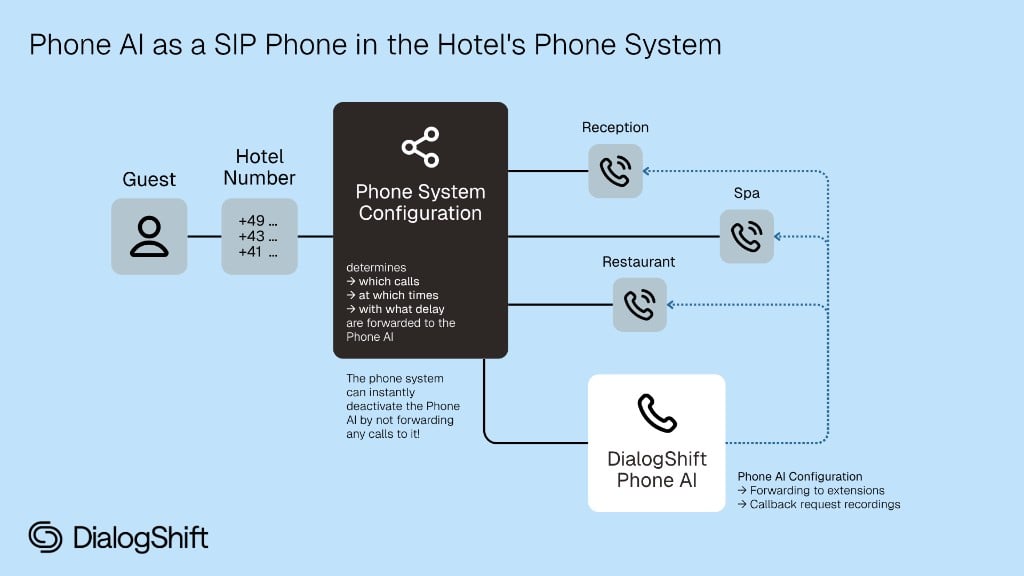
Voice AI systems like the DialogShift Phone AI introduce a new way of accessing the phone system that has not previously been part of a hardware phone system setup: registering a phone from the internet. Until now, operating a hardware phone system only required an outgoing connection to the telephone provider, while all phones — whether hardware phones or softphones — were located within the hotel network. To connect the Phone AI to a hardware phone system within the hotel network, it is necessary to allow access to the phone system from the internet. This requires port forwarding in the firewall or router. Recommendations for securing this can be found in the “Security” section. For a successful SIP and voice connection, several ports or port ranges need to be opened:- One port for the SIP connection
- A port range for the audio connections
Anyone already using a modern cloud phone system connects all phones over the internet. Here there is no longer any difference between a local hardware phone and the Phone AI.
Seamless Integration
Integration like a regular SIP endpoint
Free Transfers
Transfers to your team without additional costs
Best Voice Quality
Direct SIP connection for optimal audio quality
Full Control
Routing remains in your phone system
What we need from you
Your phone system must be SIP-capable and allow registrations via the internet. SIP-Endpoints only reachable in the network of the telephone provider can not be used.
1
Set up SIP account
Separate account specifically for Phone AI
2
Provide access data
Complete SIP access data (see below)
3
Forwarding targets
Either a single internal target number (extension or group) or up to four department-specific targets to which calls can be forwarded based on the topic.
4
Test number
An externally reachable phone number we can use to test the Phone AI.
Required SIP Access Data
Always required:- Username (without spaces)
- Password
- Endpoint (URL or IP address)
- Port
- Proxy (URL or IP address)
Additional Requirements
Local Phone Systems
You need one of the following options:- Fixed IP address (IPv4 or IPv6)
- Dynamic DNS (there may be brief interruptions during IP changes)
- Failover reliability Our softphone always registers with two softphones to the phone system.
DialogShift can neither guarantee compatibility nor estimate the setup effort.
Internal transfers
Please provide the internal target number (extension or group). Alternatively, you can provide up to four department-specific target numbers. The Phone AI decides contextually which target to transfer to.The behavior (forwarding to the target, taking a callback request, or no forwarding) can be configured flexibly per department on a schedule in the DialogShift app.
Security Considerations
With a cloud phone system, the provider already takes care of the secure network configuration.
- Using a long and strong password (24-32 characters, uppercase, lowercase, and numbers)
- Limiting the port forwarding in the firewall / router to the IPs of the DialogShift Phone AI. Please request the IPs from DialogShift Support. This prevents access from any system other than DialogShift.
Encrypted Connection
SIP connections as well as RTP audio connections are not encrypted by default. We recommend using an encrypted connection, provided the phone system supports it. DialogShift can establish connections via TLSv1.3 (recommended) and TLSv1.2 (legacy). Older TLS versions are no longer considered secure and are therefore not supported by DialogShift. When providing the SIP access data, please indicate whether we should establish an encrypted connection (TLSv1.3 or TLSv1.2) or an unencrypted connection (UDP or TCP).Next Steps
Contact us
Send access data to support@dialogshift.com
Configure transfers
Ensure that the original caller’s number is displayed when transferring.
FAQ
Why does DialogShift register with the phone system and not the other way around?
Why does DialogShift register with the phone system and not the other way around?
The DialogShift Phone AI is a phone, not a phone system, and operates on the same level as a classic hardware phone. The Phone AI does not take on any phone system functions. Hardware phones always register with their respective phone system. To maximize compatibility with different phone systems, the Phone AI simulates a hardware phone.
Why is a new call started when transferring to an employee instead of handing off the call via REFER?
Why is a new call started when transferring to an employee instead of handing off the call via REFER?
The DialogShift Phone AI offers advanced features such as reclaiming transferred calls when unanswered and handing over a call summary to the employee (whispering feature), which can be enabled dynamically in the DialogShift app. These features cannot be implemented via REFER. To enable them and ensure configuration flexibility, the Phone AI always initiates a new outgoing call. The SIP account of the DialogShift Phone AI must therefore be able to and have the necessary permissions to initiate new calls to all configured transfer destinations.
Can the DialogShift Phone AI also be registered over a VPN connection?
Can the DialogShift Phone AI also be registered over a VPN connection?
No, this is not possible. The DialogShift Phone AI was developed with modern cloud phone systems in mind, which use a classic SIP registration over the internet. With a strong password and a firewall restriction to the DialogShift IP addresses, a security level similar to a VPN connection can be achieved. Due to the significantly greater setup effort and the wide variety of available VPN software solutions, we therefore do not offer registration over a VPN.