> ## Documentation Index
> Fetch the complete documentation index at: https://docs.dialogshift.com/llms.txt
> Use this file to discover all available pages before exploring further.
# Phone AI SIP Integration
> Technical requirements and prerequisites for setting up Phone AI as a SIP phone
## Introduction
Voice AI systems like the DialogShift Phone AI introduce a new way of accessing the phone system that has not previously been part of a hardware phone system setup: registering a phone from the internet. Until now, operating a hardware phone system only required an outgoing connection to the telephone provider, while all phones — whether hardware phones or softphones — were located within the hotel network.
To connect the Phone AI to a hardware phone system within the hotel network, it is necessary to allow access to the phone system from the internet. This requires port forwarding in the firewall or router. Recommendations for securing this can be found in the "Security" section. For a successful SIP and voice connection, several ports or port ranges need to be opened:
* One port for the SIP connection
* A port range for the audio connections
One audio port is required per simultaneous call, so we recommend allowing for a larger range for the audio connections.
Beyond that, the correct configuration of the phone system is crucial. When establishing a call, both devices — i.e. the phone or Phone AI and the phone system — exchange the IP addresses on which they expect to receive audio data. The phone system must provide the hotel's public IP address here, because the Phone AI on the internet is not able to reach the phone system via its internal IP address. To do this, the phone system must know its public IP address, for example through a fixed configuration or a STUN server.
Some routers / firewalls can dynamically adjust SIP communication to correct incorrect IP addresses or ports; this usually does not cause any problems. However, there are also routers / firewalls that send the data over different ports but do not correct the packets. In this case, a setting on the DialogShift side is required to use the actual ports instead of the communicated ports. For the IP address this is not possible; the IP address of the phone system must always be communicated correctly.
Anyone already using a modern cloud phone system connects all phones over the internet. Here there is no longer any difference between a local hardware phone and the Phone AI.
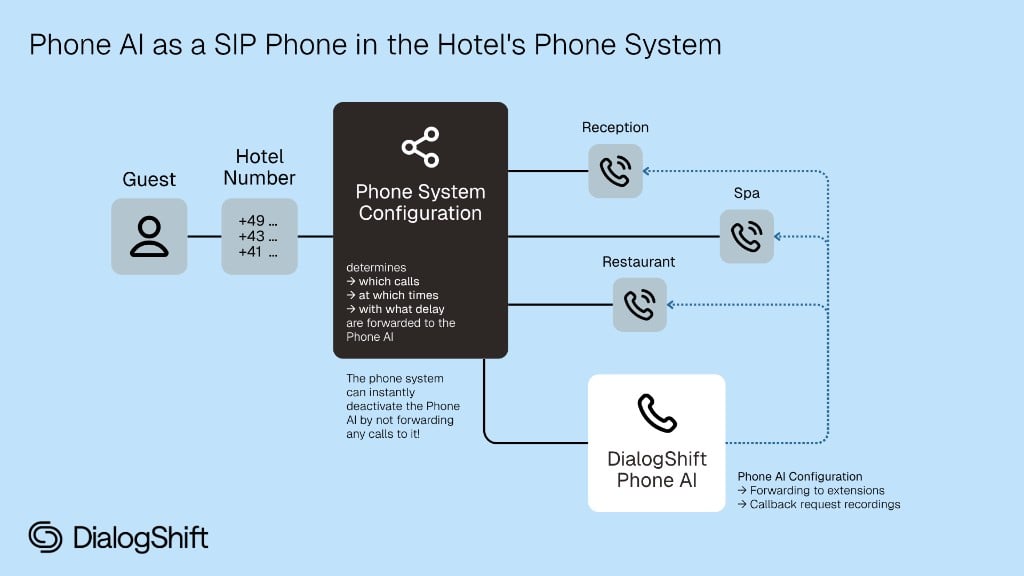
Integration like a regular SIP endpoint
Transfers to your team without additional costs
Direct SIP connection for optimal audio quality
Routing remains in your phone system
 ## What we need from you
Your phone system must be SIP-capable and allow registrations via the internet. SIP-Endpoints only reachable in the network of the telephone provider can not be used.
Separate account specifically for Phone AI
Complete SIP access data (see below)
Either a single internal target number (extension or group) or up to four department-specific targets to which calls can be forwarded based on the topic.
An externally reachable phone number we can use to test the Phone AI.
## Required SIP Access Data
**Always required:**
* Username (without spaces)
* Password
* Endpoint (URL or IP address)
* Port
**If available:**
* Proxy (URL or IP address)
## Additional Requirements
### Local Phone Systems
You need **one** of the following options:
* **Fixed IP address** (IPv4 or IPv6)
* **Dynamic DNS** (there may be brief interruptions during IP changes)
* **Failover reliability** Our softphone always registers with **two** softphones to the phone system.
The Phone AI was designed for modern cloud phone systems that are already accessible via the internet. Older hardware phone systems are also compatible, provided they **fully** support the SIP 2.0 standard and have been configured correctly for operation with a phone connected via the internet. In particular, this means that the phone system knows its public IP address (e.g. via a STUN server) and advertises it as the target for audio transmission during call setup, and that all ports required for audio transmission are open.
For security reasons, we recommend limiting port openings to our IP addresses. These can be requested from support.
DialogShift can neither guarantee compatibility nor estimate the setup effort.
### Internal transfers
Please provide the internal target number (extension or group). Alternatively, you can provide up to four department-specific target numbers. The Phone AI decides contextually which target to transfer to.
The behavior (forwarding to the target, taking a callback request, or no forwarding) can be configured flexibly per department on a schedule in the DialogShift app.
The Phone AI does not perform a technical transfer (Refer). Instead, it creates a new call to the internal target number and connects this call with the calling customer. This is necessary to implement the "call reclaim" and "whisper" features. A Refer is not possible, even if neither "call reclaim" nor "whisper" is to be used.
It must be ensured that the Phone AI's extensions are allowed to initiate calls to the internal target number. If the phone system rejects these calls, the Phone AI will end the customer's call.
## Security Considerations
With a cloud phone system, the provider already takes care of the secure network configuration.
The DialogShift Phone AI can be securely integrated into the phone system via a SIP connection. For this, the SIP endpoint must be reachable from the internet. For secure operation, we recommend:
* Using a long and strong password (24-32 characters, uppercase, lowercase, and numbers)
* Limiting the port forwarding in the firewall / router to the IPs of the DialogShift Phone AI. Please request the IPs from DialogShift Support. This prevents access from any system other than DialogShift.
Since we cannot know the network setup at the hotel, we can only provide general recommendations. The implementation decision and responsibility lies with the hotel or the person responsible there.
### Encrypted Connection
SIP connections as well as RTP audio connections are not encrypted by default. We recommend using an encrypted connection, provided the phone system supports it. DialogShift can establish connections via TLSv1.3 (recommended) and TLSv1.2 (legacy). Older TLS versions are no longer considered secure and are therefore not supported by DialogShift. When providing the SIP access data, please indicate whether we should establish an encrypted connection (TLSv1.3 or TLSv1.2) or an unencrypted connection (UDP or TCP).
## Next Steps
Send access data to [support@dialogshift.com](mailto:support@dialogshift.com)
Ensure that the original caller's number is displayed when transferring.
Setup duration: 1–2 business days after receiving all information.
## FAQ
The DialogShift Phone AI is a phone, not a phone system, and operates on the same level as a classic hardware phone. The Phone AI does not take on any phone system functions. Hardware phones always register with their respective phone system. To maximize compatibility with different phone systems, the Phone AI simulates a hardware phone.
The DialogShift Phone AI offers advanced features such as reclaiming transferred calls when unanswered and handing over a call summary to the employee (whispering feature), which can be enabled dynamically in the DialogShift app. These features cannot be implemented via REFER. To enable them and ensure configuration flexibility, the Phone AI always initiates a new outgoing call. The SIP account of the DialogShift Phone AI must therefore be able to and have the necessary permissions to initiate new calls to all configured transfer destinations.
No, this is not possible. The DialogShift Phone AI was developed with modern cloud phone systems in mind, which use a classic SIP registration over the internet. With a strong password and a firewall restriction to the DialogShift IP addresses, a security level similar to a VPN connection can be achieved. Due to the significantly greater setup effort and the wide variety of available VPN software solutions, we therefore do not offer registration over a VPN.
## What we need from you
Your phone system must be SIP-capable and allow registrations via the internet. SIP-Endpoints only reachable in the network of the telephone provider can not be used.
Separate account specifically for Phone AI
Complete SIP access data (see below)
Either a single internal target number (extension or group) or up to four department-specific targets to which calls can be forwarded based on the topic.
An externally reachable phone number we can use to test the Phone AI.
## Required SIP Access Data
**Always required:**
* Username (without spaces)
* Password
* Endpoint (URL or IP address)
* Port
**If available:**
* Proxy (URL or IP address)
## Additional Requirements
### Local Phone Systems
You need **one** of the following options:
* **Fixed IP address** (IPv4 or IPv6)
* **Dynamic DNS** (there may be brief interruptions during IP changes)
* **Failover reliability** Our softphone always registers with **two** softphones to the phone system.
The Phone AI was designed for modern cloud phone systems that are already accessible via the internet. Older hardware phone systems are also compatible, provided they **fully** support the SIP 2.0 standard and have been configured correctly for operation with a phone connected via the internet. In particular, this means that the phone system knows its public IP address (e.g. via a STUN server) and advertises it as the target for audio transmission during call setup, and that all ports required for audio transmission are open.
For security reasons, we recommend limiting port openings to our IP addresses. These can be requested from support.
DialogShift can neither guarantee compatibility nor estimate the setup effort.
### Internal transfers
Please provide the internal target number (extension or group). Alternatively, you can provide up to four department-specific target numbers. The Phone AI decides contextually which target to transfer to.
The behavior (forwarding to the target, taking a callback request, or no forwarding) can be configured flexibly per department on a schedule in the DialogShift app.
The Phone AI does not perform a technical transfer (Refer). Instead, it creates a new call to the internal target number and connects this call with the calling customer. This is necessary to implement the "call reclaim" and "whisper" features. A Refer is not possible, even if neither "call reclaim" nor "whisper" is to be used.
It must be ensured that the Phone AI's extensions are allowed to initiate calls to the internal target number. If the phone system rejects these calls, the Phone AI will end the customer's call.
## Security Considerations
With a cloud phone system, the provider already takes care of the secure network configuration.
The DialogShift Phone AI can be securely integrated into the phone system via a SIP connection. For this, the SIP endpoint must be reachable from the internet. For secure operation, we recommend:
* Using a long and strong password (24-32 characters, uppercase, lowercase, and numbers)
* Limiting the port forwarding in the firewall / router to the IPs of the DialogShift Phone AI. Please request the IPs from DialogShift Support. This prevents access from any system other than DialogShift.
Since we cannot know the network setup at the hotel, we can only provide general recommendations. The implementation decision and responsibility lies with the hotel or the person responsible there.
### Encrypted Connection
SIP connections as well as RTP audio connections are not encrypted by default. We recommend using an encrypted connection, provided the phone system supports it. DialogShift can establish connections via TLSv1.3 (recommended) and TLSv1.2 (legacy). Older TLS versions are no longer considered secure and are therefore not supported by DialogShift. When providing the SIP access data, please indicate whether we should establish an encrypted connection (TLSv1.3 or TLSv1.2) or an unencrypted connection (UDP or TCP).
## Next Steps
Send access data to [support@dialogshift.com](mailto:support@dialogshift.com)
Ensure that the original caller's number is displayed when transferring.
Setup duration: 1–2 business days after receiving all information.
## FAQ
The DialogShift Phone AI is a phone, not a phone system, and operates on the same level as a classic hardware phone. The Phone AI does not take on any phone system functions. Hardware phones always register with their respective phone system. To maximize compatibility with different phone systems, the Phone AI simulates a hardware phone.
The DialogShift Phone AI offers advanced features such as reclaiming transferred calls when unanswered and handing over a call summary to the employee (whispering feature), which can be enabled dynamically in the DialogShift app. These features cannot be implemented via REFER. To enable them and ensure configuration flexibility, the Phone AI always initiates a new outgoing call. The SIP account of the DialogShift Phone AI must therefore be able to and have the necessary permissions to initiate new calls to all configured transfer destinations.
No, this is not possible. The DialogShift Phone AI was developed with modern cloud phone systems in mind, which use a classic SIP registration over the internet. With a strong password and a firewall restriction to the DialogShift IP addresses, a security level similar to a VPN connection can be achieved. Due to the significantly greater setup effort and the wide variety of available VPN software solutions, we therefore do not offer registration over a VPN.