> ## Documentation Index
> Fetch the complete documentation index at: https://docs.dialogshift.com/llms.txt
> Use this file to discover all available pages before exploring further.
# Phone AI Call Forwarding
> Setting up Phone AI via call forwarding for locations in Germany
This integration method is **only available for locations within Germany**.
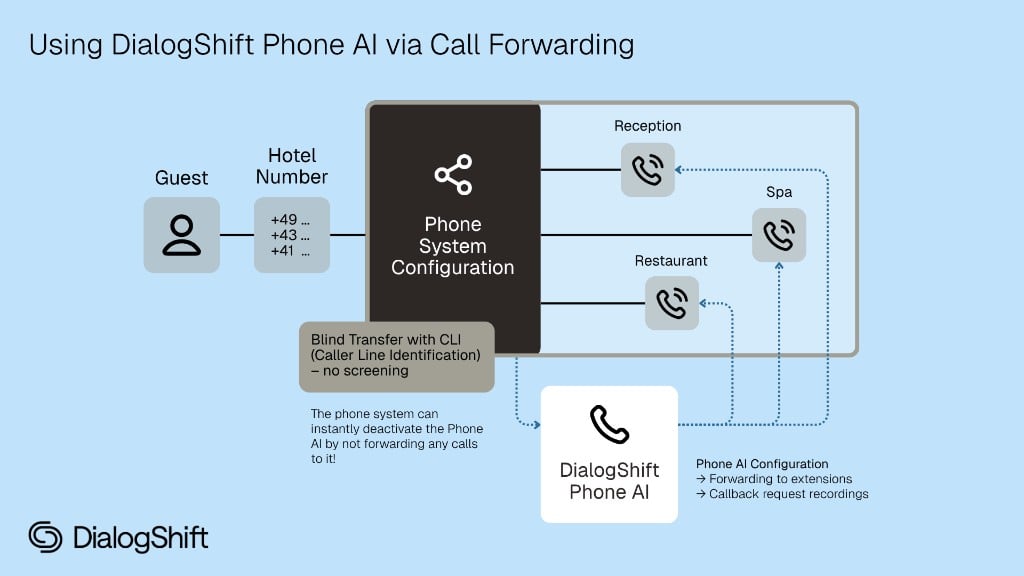
Integration is done by forwarding incoming calls to a phone number provided by DialogShift.
 ## Technical Configuration
The forwarding must be configured as **"Blind Transfer with CLI (Caller Line Identification) - no screening"**:
* **Blind Transfer**: Direct forwarding without inquiry
* **CLI Pass-Through**: Original caller ID is maintained (absolutely required!)
* **No Screening**: No verification before forwarding
The exact designation may vary depending on the phone system. Important is that the original caller ID is preserved.
## What we need from you
Contact us for your dedicated Phone AI number
Configure forwarding with CLI pass-through
For transfers to employees (prevents endless loop)
## Flexible Activation
We recommend completing the technical setup of call forwarding entirely during the setup phase. However, the actual activation of forwarding should only occur when the hotel wants to actively use Phone AI.
This approach enables flexible control tailored to the hotel's specific needs. Common scenarios are:
* **Time-controlled activation:** Only at night or during certain peak hours.
* **Overflow scenario:** Only when reception is unreachable or all lines are busy.
* **Permanent activation:** For 24/7 phone service through Phone AI.
As a technical contact, it's important to test all functionalities during setup. Later activation can then be done in consultation with the hotel at desired times.
## Important Requirements
### Separate Employee Extension
Without a separate extension, endless loops can occur between Phone AI and the main number.
You need:
* Separate phone number or
* Special extension or
* Direct extension
This number must **not** redirect back to Phone AI!
## Next Steps
Contact [support@dialogshift.com](mailto:support@dialogshift.com)
## Technical Configuration
The forwarding must be configured as **"Blind Transfer with CLI (Caller Line Identification) - no screening"**:
* **Blind Transfer**: Direct forwarding without inquiry
* **CLI Pass-Through**: Original caller ID is maintained (absolutely required!)
* **No Screening**: No verification before forwarding
The exact designation may vary depending on the phone system. Important is that the original caller ID is preserved.
## What we need from you
Contact us for your dedicated Phone AI number
Configure forwarding with CLI pass-through
For transfers to employees (prevents endless loop)
## Flexible Activation
We recommend completing the technical setup of call forwarding entirely during the setup phase. However, the actual activation of forwarding should only occur when the hotel wants to actively use Phone AI.
This approach enables flexible control tailored to the hotel's specific needs. Common scenarios are:
* **Time-controlled activation:** Only at night or during certain peak hours.
* **Overflow scenario:** Only when reception is unreachable or all lines are busy.
* **Permanent activation:** For 24/7 phone service through Phone AI.
As a technical contact, it's important to test all functionalities during setup. Later activation can then be done in consultation with the hotel at desired times.
## Important Requirements
### Separate Employee Extension
Without a separate extension, endless loops can occur between Phone AI and the main number.
You need:
* Separate phone number or
* Special extension or
* Direct extension
This number must **not** redirect back to Phone AI!
## Next Steps
Contact [support@dialogshift.com](mailto:support@dialogshift.com)